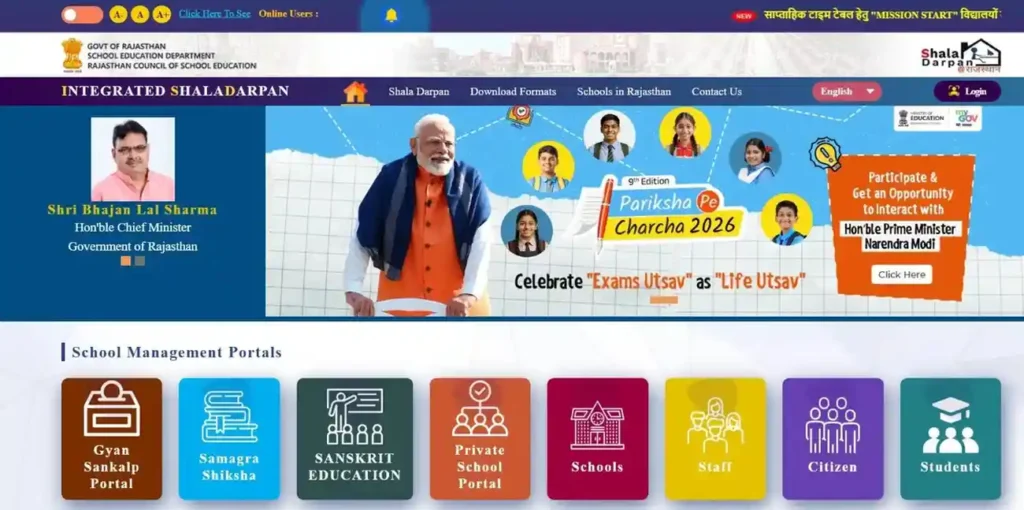
Shala Darpan is the official ICT portal of the Rajasthan School Education Department, managed by RCSE. It integrates real-time data for over 65,000 schools, 8 million students, and 4 lakh staff members. It is the primary platform for Staff Login, Internship Allotment, and Board Results in Rajasthan.
What is the Integrated Shala Darpan Rajasthan Portal?
The Integrated Shala Darpan portal is the backbone of Rajasthan’s digital education system. Developed by NIC Rajasthan, it serves as a live database to streamline school administration and transparency.
While Raj Shala Darpan is a massive data hub for 65,000+ schools, its real impact is personal. It helps teachers manage their professional journey through the Staff Window and allows parents to monitor their child’s academic progress and scholarship status. Essentially, Rajasthan Shala Darpan transforms complex government data into actionable information for every citizen.
Shala Darpan Staff Window: Login, Registration & Services
The Staff Window (often called the Staff Corner) is a dedicated environment designed specifically for Rajasthan’s education department employees. Unlike the School Login, this is a personalized space where individual teachers manage their service records, apply for leaves, and track career progression. To access these services, every employee must have their unique Staff NIC-SD ID.
How to Find Your School & Staff NIC-SD ID
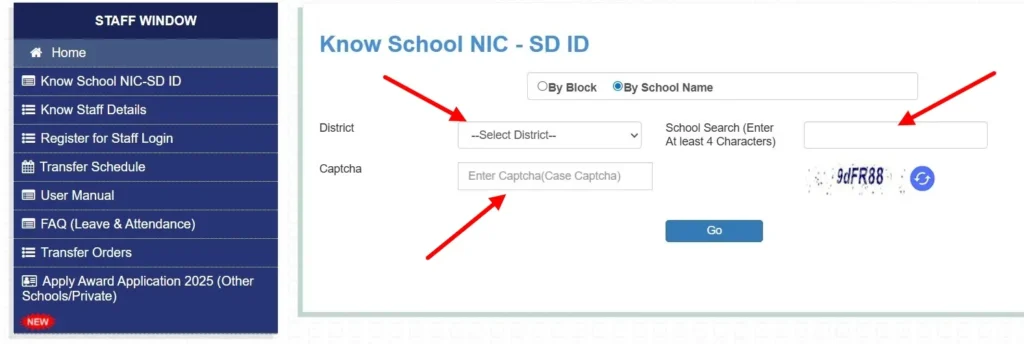
Before registering, you must know your NIC-SD ID. This is a unique 7-digit identification code assigned to every school and employee in the Rajasthan Education Department. If you do not have your ID, follow these official steps to retrieve it:
- Visit the official Shala Darpan portal (rajshaladarpan.rajasthan.gov.in) and click on Staff Window.
- Click on the “Know Staff Details” or “Know School NIC-SD ID” link located in the sidebar/footer.
- Search by School Name: Enter your school’s name (minimum 4 characters), select your District, and enter the Captcha.
- Search by Block: Select your District and Block to see a full list of schools and their corresponding 7-digit IDs.
- Once you find your school, click on it to view the specific Staff NIC-SD IDs for all teachers currently posted there.
Register for Staff Login (First-Time Users)
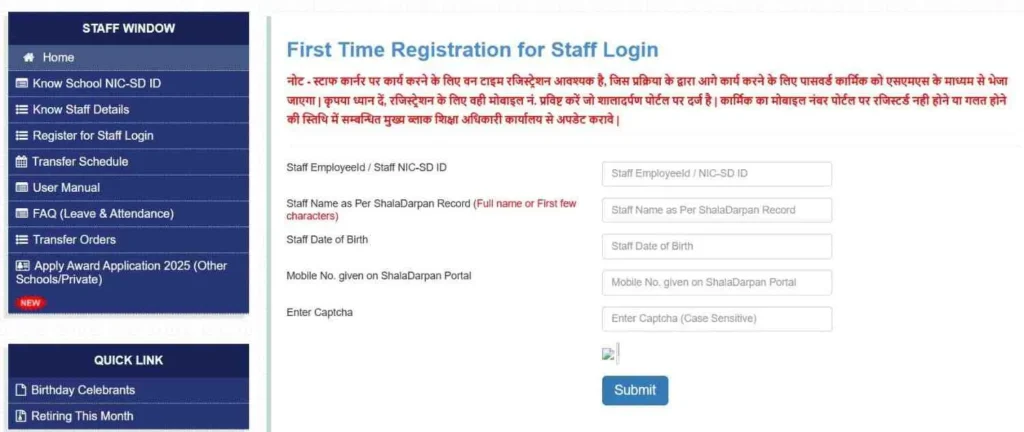
If you are a newly appointed teacher or have never logged in, you must complete the One-Time Registration (OTR). Follow these precise steps:
- Go to the Staff Window homepage and select the “Register for Staff Login” option.
- Enter Credentials: Input your 7-digit Staff NIC-SD ID, your Name (as per service records), Date of Birth, and your registered Mobile Number.
- Submit & Verify: Click ‘Submit’. The portal will send a One-Time Password (OTP) to the mobile number linked to your Format 10.
- Complete Registration: Enter the OTP to verify your identity. Your Username and Password will be sent to you via SMS immediately.
Transfer Schedules & Office Orders
The Staff Window is the only official channel for managing service movements. Teachers no longer need to visit the Bikaner Directorate or District offices for updates; everything is integrated here:
- Transfer Schedule: Under the “Apply” tab, you can view active Transfer Schedules and submit your application during the open window.
- Office Orders: Once a transfer or promotion is finalized, you can download your Joining or Relieving Orders directly from the “Documents” section.
- Format 10 Verification: Regularly check your Personal Detail Format 10 to ensure your service record is accurate, as this data dictates your seniority and eligibility for future orders.
Shala Darpan Internship Portal 2026: B.Ed & D.El.Ed Allotment
The Shala Darpan Internship module is the official regulatory point for all teacher trainees in Rajasthan. Whether you are enrolled in B.Ed, D.El.Ed (BSTC), or integrated BA-BEd/BSc-BEd programs, your school allotment for practical training is managed exclusively through this portal. The process is strictly merit and preference-based, conducted in multiple rounds throughout the academic session.
How to Check Internship Allotment Status
Trainees must follow a specific timeline for Choice Filling to secure a preferred school. Once the department processes the applications, follow these steps to check your result:
- Visit the Integrated Shala Darpan Internship portal.
- Navigate to the “Candidate Login” section.
- Enter your Username, Password, and the Captcha code (use the ‘Forgot Password’ tool if you’ve lost your credentials).
- Once logged in, click on the “Internship Request” tab and select “Allotment Status.”
- If a school has been assigned, you can download your Allotment Letter, which must be submitted to the allotted school within the stipulated timeframe.
Exams & Schemes: 5th & 8th Board Result 2026
For students and parents, the SD5 and SD8 modules of Shala Darpan are the primary sources for academic records. Rajasthan’s Class 5 (Primary) and Class 8 (Middle) Board exams are high-stakes assessments, and the Integrated Shala Darpan portal is the first to host the official results.
Steps to Download 5th & 8th Class Marksheets:
To reduce server load during result declarations, the portal offers two primary search methods:
- Roll Number & District: The most accurate method. Select your class, enter your roll number, and choose your district to view the marksheet.
- Name & Date of Birth: If you’ve misplaced your admit card, select the “Search by Name” option. You will need to enter the student’s name, father’s name, and DOB to verify the record.
Student Schemes: Lado Yojana, Gargi Puraskar & Scholarships
The Beneficiary Scheme Portal (BSP) within Shala Darpan manages direct benefit transfers for eligible students. The department currently prioritizes the following:
- Gargi Puraskar: Girls scoring 75% or above in 10th or 12th board exams are eligible for financial awards. Applications are verified directly through school records on the portal.
- Lado Yojana: A key initiative focused on the financial empowerment and education of the girl child.
- Pre & Post-Matric Scholarships: Eligibility is automatically tracked via the portal based on Category (SC/ST/OBC/EWS) and family income data synced with Jan Aadhaar.
Citizen Window: Search Schools & Schemes in Rajasthan
The Citizen Window is the public-facing side of the Integrated Shala Darpan portal. A major advantage of this section is that No Login is Required. It is designed specifically for parents, guardians, and community members who need transparent access to school-level data without administrative credentials.
Finding Schools by Pincode or District
Whether you are looking for a new admission or checking a school’s standing, the “Search School” tool provides real-time infrastructure and staffing reports.
- Location-Based Search: Use your Pincode or select your District and Block to generate a list of all nearby government schools.
- Infrastructure Reports: Before visiting, you can verify if a school has functional classrooms, drinking water, and playground facilities.
- Teacher Count & Enrollment: View the number of sanctioned vs. working teachers and the current student strength. This helps parents make informed decisions based on the teacher-student ratio.
Fixing Common Shala Darpan Portal Errors
Government portals often face high traffic loads, leading to technical glitches. While most sites just list links, we provide verified solutions to the most common errors reported by Rajasthan teachers and parents.
Expert Solutions for Portal Glitches
- “Session Expired” or Continuous Loading:
- The Cause: Outdated browser cookies or a cluttered cache.
- The Fix: Use Incognito Mode (Ctrl+Shift+N) or clear your browser cache. For the best experience, use the latest version of Google Chrome on a desktop.
- “Mobile Number Not Registered” Error:
- The Cause: Your current mobile number does not match the record in the school database.
- The Fix: You cannot change this yourself. You must contact your School Principal or Block Office to update your Format 10. Once updated, the Staff Window will allow you to register.
- “Invalid Captcha” Loop:
- The Cause: The captcha session has timed out before submission.
- The Fix: Always Refresh the Captcha image immediately before typing it and clicking “Login.” Do not reuse a captcha that has been on your screen for more than 2 minutes.
- OTP Not Arriving:
- The Fix: Check if DND (Do Not Disturb) is active on your phone. If the portal says “OTP Sent” but you don’t receive it, wait 5 minutes before clicking “Resend” to avoid locking your account.
FAQ
What is the official website of Shala Darpan?
The official website for Integrated Shala Darpan is https://rajshaladarpan.nic.in. For specific school education services, you may also use rajshaladarpan.rajasthan.gov.in.
How do I change my mobile number in Shala Darpan?
You cannot change your mobile number via the Staff Window. You must submit a request to your School Principal to update your Format 10 in the School Login. Once updated, the new number will automatically sync for Staff Login and OTP purposes.
Can private schools access the Shala Darpan portal?
No, private schools use a separate integrated wing called the PSP Portal (Private School Portal) at https://rajpsp.nic.in. It is used for RTE admissions and student tracking, though it is semantically linked to the main Shala Darpan database.
Where is the Rajiv Gandhi Career Portal login?
Students can access the Rajiv Gandhi Career Guidance Portal using their Shala Darpan School ID (NIC-SD ID) and Student SR Number. It is specifically designed for career counseling for students in Classes 9–12.
What should I do if my Staff Window password is not working?
Use the “Forgot Password” link on the Staff Login page. You will need your Staff NIC-SD ID and registered mobile number to reset it. If the issue persists, ensure your browser cache is cleared.