Shala Darpan School Login: Step-by-Step Guide (2026)
If you are a head teacher, PEEO, or the Shala Darpan in-charge at a government school in Rajasthan, the Shala Darpan school login is the door to almost everything your school reports online: admissions, student attendance, transfer certificates, staff records, scholarships and board exam data. This guide walks you through the exact login process on the official Integrated Shala Darpan portal, shows you how to find your school’s user ID if you’ve lost it, and explains what to do when the login simply refuses to work.
Quick answer: Open rajshaladarpan.rajasthan.gov.in → click Login → choose School/Office Login → enter your User Id, Password and the captcha → click Login. Forgot your username? Use School Username Search on the same page.
What Is the Shala Darpan School Login?
Integrated Shala Darpan (शाला दर्पण, literally “school mirror”) is the school management and monitoring portal of the School Education Department, Government of Rajasthan. It was designed and developed by the National Informatics Centre (NIC), Rajasthan for the Rajasthan Council of School Education (RCScE), and the state’s Shala Darpan cell works out of Shiksha Sankul in Jaipur, with a second cell at the Directorate of Secondary Education in Bikaner.
The portal has two separate sign-in doors, and mixing them up is the most common reason people get stuck:
| School/Office Login | Staff Login (Staff Window) | |
|---|---|---|
| Who uses it | The institution: school head, PEEO/UCEEO, data-entry in-charge, block and district offices | An individual teacher or employee |
| What it manages | The whole school’s records: students, staff, infrastructure, schemes | Your own service record, leave, transfer applications, documents |
| Username | The school’s/office’s user ID issued by the department | Your personal Staff NIC-SD ID |
This article covers the School/Office Login. If you are a teacher trying to check your own Format 10 or apply for a transfer, you need the Staff Window instead.
What You Can Do After Logging In
Once inside the school login, the dashboard gives access to the modules the department uses for day-to-day monitoring. According to the portal’s own help-desk listing, these include:
- Student modules – new admission, Format 7, 7A and 9, transfer certificates (TC), online student attendance, PEN/APAAR ID, CWSN student data, local and board exam entries (Classes 5, 8, 10 and 12).
- Staff modules – Format 10 (staff service details), online staff attendance and leave, teacher arrangement and duty monitoring.
- School profile – infrastructure details, SMC/SDMC records, PEEO/UCEEO mapping and GIS location.
- Schemes and DBT – scholarship modules, Aadhaar and Jan Aadhaar authentication, uniform DBT, free textbooks, cycle and tablet distribution, Palanhar and student group insurance.
In short, if the department needs a number from your school, it almost certainly comes from data entered through this login.
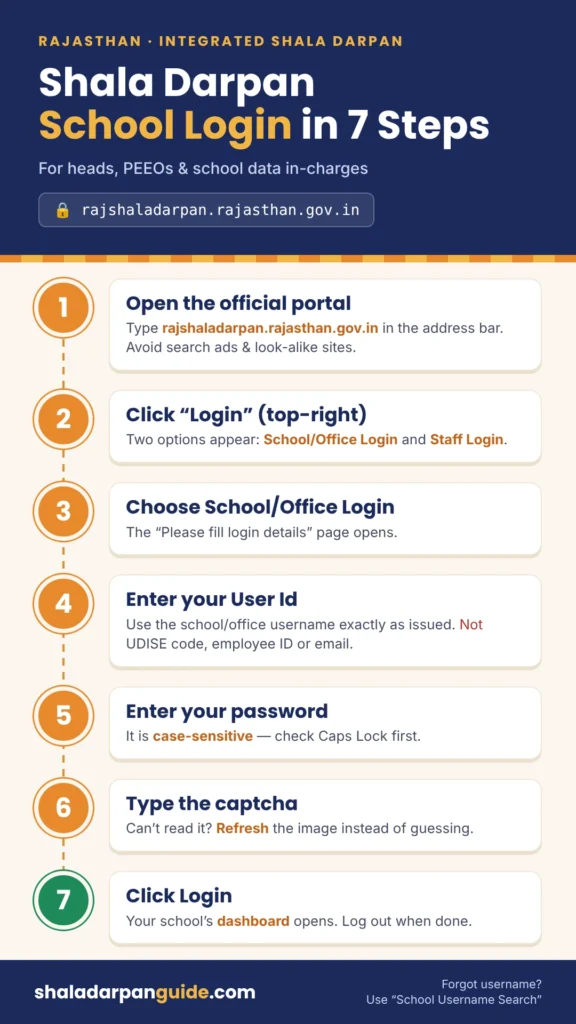
How to Do Shala Darpan School Login: Step by Step
Before you start, keep ready: your school/office User Id, your password, and a desktop or laptop with an updated browser (the portal works on mobile, but long data-entry forms are easier on a larger screen).
- Open the official portal. Type rajshaladarpan.rajasthan.gov.in directly into the address bar. Typing the address yourself is safer than clicking a search ad, since several private sites copy the Shala Darpan name and design.
- Open the login menu. In the top-right menu, click Login. Two options appear: School/Office Login and Staff Login.
- Choose School/Office Login. The page titled “Please fill login details” opens.
- Enter your User Id. Type the username issued to your school or office exactly as given. Do not use a UDISE code, an employee ID or an email address here.
- Enter your password. Passwords are case-sensitive, so check Caps Lock.
- Type the captcha. Enter the characters shown in the image. If it is unreadable, refresh it rather than guessing.
- Click Login. You will land on your school’s dashboard.
Tip: If you see a notice saying you are already logged in, the portal is detecting an older open session. Log out from that session, or close the browser completely, and then log in again.
How to Find Your School Username (School Username Search)
Lost the school’s user ID after a change of principal or in-charge? The login page has a built-in lookup, so you don’t need to call anyone first.
- On the School/Office Login page, click School Username Search.
- Select your District from the dropdown. The list includes Rajasthan’s newer districts such as Balotara, Beawar, Deeg, Didwana-Kuchaman, Khairthal-Tijara, Kotputli-Behror, Phalodi and Salumbar, so pick the district your school is currently mapped to.
- Select your Block.
- Select your School from the list to view its login details.
Block and district education offices should use Office Username Search, the link right next to it.
If you also need the school’s NIC-SD ID for other services, the public Schools in Rajasthan search on the portal lets anyone look up a school without logging in.
Forgot Password? Here’s How to Reset It
- On the login page, click Forgot Password.
- Enter your school’s User Name and the captcha.
- Follow the on-screen verification steps to set a new password.
If the reset fails because the contact details on record are outdated, you cannot fix that from the reset screen. Contact your PEEO/UCEEO or the Block (CBEO) office, which can get the institution’s details updated before you try again.
Common Shala Darpan School Login Problems and Fixes
| Problem | Likely cause | What to do |
|---|---|---|
| “Invalid User Id or Password” | Wrong login door, or a typo in the user ID | Confirm you chose School/Office Login, not Staff Login. Re-check the ID via School Username Search. |
| Captcha keeps failing | The captcha expired while the page sat open | Refresh the captcha and submit immediately. |
| “Already logged in” message | An older session is still active | Log out, or close every browser window, then log in again. |
| Page won’t load or keeps spinning | Server load or scheduled maintenance | The portal posts maintenance notices on the login page (login is sometimes paused for a few hours). Try again later, ideally outside peak hours. |
| Login works but a module is missing | Module not enabled or mapping issue | Raise a help-desk token (see below). |
| Old pages or broken layout | Cached files in the browser | Clear cache, or try a private/incognito window. |
Shala Darpan Help Desk: The Right Way to Get Support
The portal asks schools to follow a specific route for technical problems, and following it gets issues resolved faster:
- Generate a token first. For any technical problem in the school login, the concerned PEEO/UCEEO raises a token through the समस्या-समाधान (problem-solution) link under the Help Desk tab in their own login.
- Contact the cell only if needed. When you call, quote the token number and date.
State Shala Darpan Cell (official contact page):
- Address: 603, V Floor, Block 5, Shiksha Sankul, J.L.N. Marg, Jaipur-302017 (Rajasthan)
- Phone: 0141-2700872, 0141-2711964 (office hours only)
- Email (Bikaner Cell): bikanersd[at]gmail[dot]com
The Contact Us page also lists subject-wise officers (student issues, school profile and new school/office login, staff and Format 10, scholarships, internship) along with division, district and block Shala Darpan contacts. Check it for the current person before calling, as postings change.
Security Tips for School Login Users
- Never share the school password over WhatsApp or with cyber cafés. Every entry made under the login is recorded against your institution.
- Change the password when the in-charge changes, for example after a transfer or retirement.
- Always log out after work, especially on shared computers in the school office.
- Bookmark the official URL so you never land on a look-alike site.
Frequently Asked Questions
- What is the official website for Shala Darpan school login? The official portal is rajshaladarpan.rajasthan.gov.in. Choose Login → School/Office Login from the top menu.
- Can a teacher use the school login for personal records? No. Personal service records, leave and transfer applications are handled through the Staff Window using the teacher’s own Staff NIC-SD ID.
- Is the school user ID the same as the UDISE code? No. UDISE+ is the national school code. Shala Darpan uses its own user ID for login, which you can look up through School Username Search.
- Who should I contact if my school’s login is blocked? Ask your PEEO/UCEEO to raise a help-desk token, then contact the block or district Shala Darpan cell with the token number.
- Do parents need a school login? No. Parents can use the public Citizen Window and school search without any login.